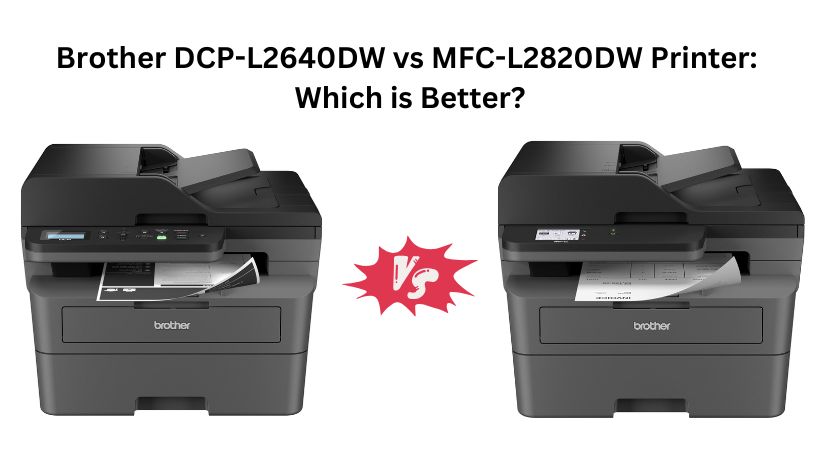
Choosing between the Brother DCP-L2640DW and Brother MFC-L2820DW can be difficult because both are compact monochrome laser printers designed for small businesses and home offices. They share the same print engine, fast 36 ppm printing speed, automatic duplex printing, wireless connectivity, and 50-sheet automatic document feeder.
However, the MFC-L2820DW adds fax functionality, a larger touchscreen display, cloud printing support, and a more business-focused feature set. The DCP-L2640DW, on the other hand, focuses on essential printing, scanning, and copying at a lower price point, making it a more affordable option for users who do not need fax capabilities.
Why Search Everywhere? Use Comparly for Your Next Comparison.
Quick Decision:Brother DCP-L2640DW vs MFC-L2820DW
- 👉 Buy the Brother DCP-L2640DW if you want a more affordable monochrome laser printer with fast 36 PPM printing, automatic duplex printing, wireless and Ethernet connectivity, a 50-sheet ADF, and reliable print, scan, and copy functionality for home offices or small businesses that don’t need fax capabilities.
- 👉 Buy the Brother MFC-L2820DW if you want a more complete office printer with fax functionality, a 2.7-inch touchscreen display, cloud printing and scan-to-cloud support, advanced workflow features, and better overall productivity for small offices that regularly handle document-intensive tasks.
Brother DCP-L2640DW vs Brother MFC-L2820DW Printer: Specs Comparison
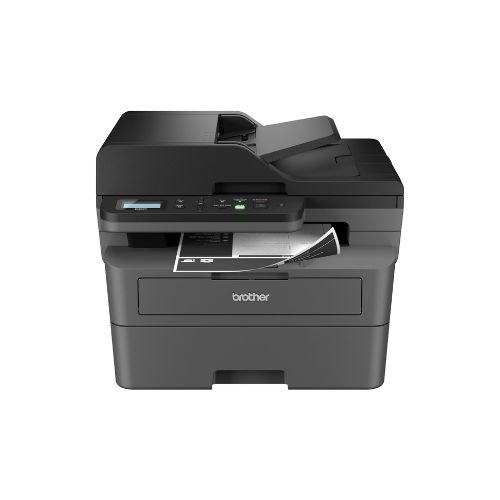
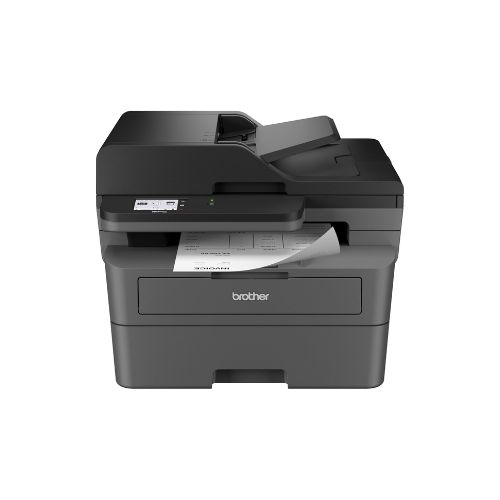
Feature | Brother DCP-L2640DW | Brother MFC-L2820DW |
Printer Type | Print, Copy, Scan | Print, Copy, Scan, Fax |
Printing Technology | Monochrome Laser | Monochrome Laser |
Print Speed | 36 ppm | 36 ppm |
Duplex Printing | Yes | Yes |
Display | Basic LCD Control Panel | 2.7-inch Touchscreen |
Connectivity | Wi-Fi, Ethernet, USB | Wi-Fi, Ethernet, USB |
Cloud App Printing | Limited | Google Drive, Dropbox, OneDrive, Evernote |
Scan Speed | 23.6/7.9 ipm | 23.6/7.9 ipm |
Price | $209 | $279 |
🏆 Which is Better Brother DCP-L2640DW vs MFC-L2820DW?
The Brother MFC-L2820DW is the better overall printer because it offers everything available on the DCP-L2640DW while adding fax functionality, a responsive 2.7-inch touchscreen, cloud integration, and a more office-friendly user experience. For businesses that regularly handle documents and require advanced workflow features, the additional $70 investment is worthwhile.
However, if you only need printing, scanning, and copying, the Brother DCP-L2640DW provides nearly identical print performance while saving money.
Top 3 Reasons to Pick the Brother MFC-L2820DW
- Includes fax functionality for business communication.
- Large 2.7-inch touchscreen improves usability.
- Built-in cloud printing and scan-to-cloud support.
Want to compare more products like this? Use Comparly for Your Next Comparison.
Design & Build Quality
Both printers use a compact desktop-friendly design that fits comfortably in small offices or home workspaces. Their physical dimensions are almost identical, measuring approximately 16.1 inches wide, 15.7 inches deep, and 12.5 inches high. Both feature a sturdy plastic construction designed for long-term business use.
The DCP-L2640DW weighs around 25 pounds, while the MFC-L2820DW is slightly lighter at 22.5 pounds. Despite their similar footprints, the MFC-L2820DW feels more premium due to its larger touchscreen interface. The DCP-L2640DW relies on traditional buttons and a basic control panel, which works well but feels less modern.
For users who interact with the printer frequently, the MFC-L2820DW offers a more refined experience.
Winner: Brother MFC-L2820DW
Print Quality & Printing Performance
Printing performance is virtually identical between these two models. Both use Brother’s monochrome laser engine capable of producing sharp black text documents suitable for business reports, invoices, contracts, and everyday office paperwork.
Each printer delivers speeds up to 36 pages per minute, making them among the faster compact monochrome printers in their category. Warm-up times are quick, and first-page output is impressive for small office environments.
Since both printers use the same toner system and print engine, users can expect identical print quality and operating costs.
Winner: Tie
Scanning & Copying Performance
Scanning capabilities are also very similar. Both printers feature flatbed scanning and a 50-sheet automatic document feeder for handling multi-page documents.
Scan speeds reach up to 23.6 images per minute in black-and-white and 7.9 images per minute in color. Both machines can efficiently digitize contracts, receipts, invoices, and business records.
Copying performance is equally strong on both printers, making either model suitable for routine office tasks.
Since neither printer offers a clear advantage in scanning or copying speed, this category remains evenly matched.
Winner: Tie
Fax Functionality
This is one of the biggest differences between the two models.
The Brother DCP-L2640DW does not include fax capabilities. It is strictly a print, scan, and copy machine.
The Brother MFC-L2820DW includes a full fax system integrated into its multifunction design. Businesses that still exchange legal documents, purchase orders, healthcare paperwork, or signed contracts through fax will find this feature valuable.
Even though faxing is less common today, many industries still depend on it.
Winner: Brother MFC-L2820DW
Connectivity & Networking
Both printers offer excellent connectivity options including:
- Dual-band Wi-Fi (2.4GHz and 5GHz)
- Ethernet networking
- USB direct connection
- Mobile printing support
- Brother Mobile Connect App
- Alexa compatibility
Users can easily print from computers, smartphones, tablets, and wireless networks.
Because both printers provide identical networking flexibility, neither model has an advantage in this category.
Winner: Tie
Control Panel & Ease of Use
The DCP-L2640DW features a traditional control panel with physical buttons and a simple display. It works well but requires more manual navigation through menus.
The MFC-L2820DW upgrades the experience significantly with a 2.7-inch color touchscreen. Users can access settings, cloud services, scan destinations, and printer functions much faster.
The touchscreen feels modern and greatly improves daily usability, especially in busy office environments.
Winner: Brother MFC-L2820DW
Cloud Printing & Smart Features
The Brother DCP-L2640DW supports mobile printing through the Brother Mobile Connect App but offers fewer built-in cloud workflow tools.
The MFC-L2820DW goes further by supporting direct print-from and scan-to services such as:
- Google Drive
- Dropbox
- Evernote
- OneNote
- Other cloud storage platforms
This capability streamlines document management and reduces reliance on a computer.
Businesses working with cloud-based workflows will appreciate the added convenience.
Winner: Brother MFC-L2820DW
Paper Handling
Paper handling is nearly identical.
Both printers include:
- 250-sheet paper tray
- 50-sheet automatic document feeder
- Automatic duplex printing
- Support for legal-size documents up to 8.5 x 14 inches
For small offices printing several hundred pages per week, either model provides sufficient paper capacity.
Neither printer offers a significant advantage here.
Winner: Tie
Running Costs & Toner
Both models use Brother TN830 and high-yield TN830XL toner cartridges. This means operating costs are essentially identical.
The printers also support Brother Refresh EZ Print Subscription Service, helping businesses automate toner replacement and potentially reduce printing costs.
Users can expect similar cost-per-page figures from both machines.
Winner: Tie
Price & Value for Money
The Brother DCP-L2640DW costs approximately $209, while the Brother MFC-L2820DW costs around $279.
The DCP-L2640DW delivers outstanding value because it offers the same print speed, scanning performance, duplex printing, and connectivity at a lower price.
However, the MFC-L2820DW justifies its higher price with fax support, cloud integration, and a touchscreen interface.
If your office requires these additional features, the price premium is reasonable.
Winner: DCP-L2640DW for value
Winner: MFC-L2820DW for features
Final Verdict
Choose the Brother DCP-L2640DW if you want the best value, lower upfront cost, and reliable monochrome printing, scanning, and copying for a home office or small business.
Choose the Brother MFC-L2820DW if you want a complete office solution with fax capability, touchscreen controls, cloud integration, and better workflow productivity.
For most business users, the Brother MFC-L2820DW is the better overall printer because of its additional features and more professional office functionality. However, budget-conscious buyers who don’t need faxing can save money and still enjoy excellent performance with the Brother DCP-L2640DW.