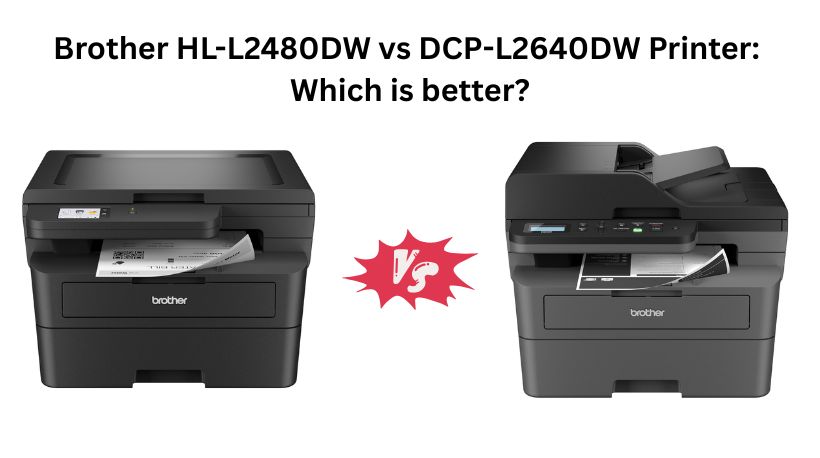
Brother offers several excellent monochrome laser printers for home offices and small businesses, but the Brother HL-L2480DW and Brother DCP-L2640DW are two of the most popular choices. Both are compact 3-in-1 laser printers with fast 36 ppm printing, automatic duplex printing, wireless connectivity, and mobile printing support.
Although they look similar on paper, one model is designed for general home and work-from-home users, while the other targets small businesses with higher scanning and copying needs. Here’s a detailed comparison to help you choose the right printer.
Why Search Everywhere? Use Comparly for Your Next Comparison.
Quick Decision: Brother HL-L2480DW vs DCP-L2640DW
🏆 Choose the Brother DCP-L2640DW if:
- You frequently scan or copy multi-page documents.
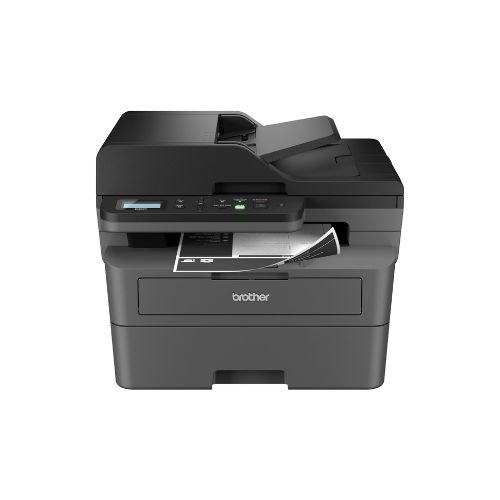
- You need a 50-page Automatic Document Feeder (ADF).
- You want the best value while spending $40 less.
- Your office regularly handles contracts, invoices, and paperwork.
🏠 Choose the Brother HL-L2480DW if:
- You mainly print documents and only occasionally scan.
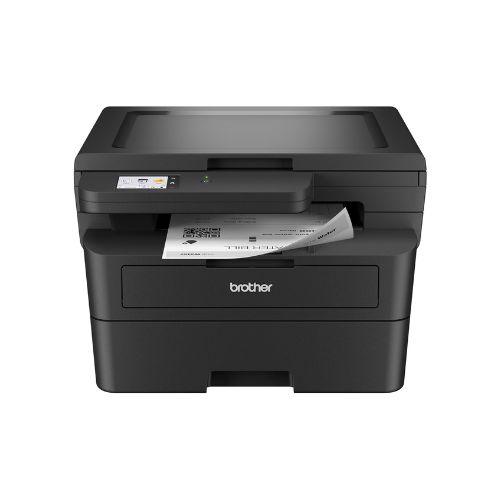
- You prefer the convenience of a 2.7-inch color touchscreen.
- You mostly use the flatbed scanner for books, IDs, or photos.
- A modern touchscreen interface matters more than an ADF.
Brother HL-L2480DW vs DCP-L2640DW Printer: Specs Comparison
Feature | Brother HL-L2480DW | Brother DCP-L2640DW |
Printer Type | Monochrome Laser 3-in-1 | Monochrome Laser 3-in-1 |
Print Speed | 36 ppm | 36 ppm |
Print Resolution | 1200 × 1200 dpi | 1200 × 1200 dpi |
Automatic Duplex | Yes | Yes |
Scanner | Flatbed | Flatbed + 50-page ADF ✅ |
Connectivity | Dual-Band Wi-Fi, Ethernet, USB | Dual-Band Wi-Fi, Ethernet, USB |
Display | 2.7-inch Touchscreen ✅ | Basic control panel |
Best For | Home Office | Small Business ⭐ |
Price | $249 | $209 ✅ |
Which Printer Is Better Brother HL-L2480DW or DCP-L2640DW?
The Brother DCP-L2640DW is the better printer for most buyers.
It offers identical print quality, the same 36 ppm print speed, automatic duplex printing, Wi-Fi, Ethernet, and mobile printing while costing $40 less. More importantly, it includes a 50-page Automatic Document Feeder, making scanning and copying multiple pages much faster.
The HL-L2480DW still has one important advantage—its 2.7-inch touchscreen, which provides a more user-friendly experience when accessing printer settings and cloud services.
Unless the touchscreen is a must-have feature, the DCP-L2640DW provides better overall value.
Top 3 Reasons to Pick Brother DCP-L2640DW
1. 50-Page Automatic Document Feeder
The biggest advantage is the included ADF.
Instead of placing every page manually on the scanner glass, you simply load a stack of papers and let the printer scan or copy automatically.
This saves significant time for office work.
2. Better Value
At $209, it costs noticeably less than the HL-L2480DW while offering more productivity features.
You pay less and receive more.
3. Better for Business Workflows
Businesses often scan contracts, invoices, receipts, and forms.
The ADF dramatically speeds up these tasks, making the DCP-L2640DW a more efficient office printer.
Want to compare more products like this? Use Comparly for Your Next Comparison.
Design & Build Quality
Both printers follow Brother’s familiar compact monochrome laser design. They feature a sturdy black plastic body that fits comfortably on a desk without occupying excessive space.
The HL-L2480DW is slightly shorter due to the absence of an automatic document feeder. This gives it a cleaner, more compact appearance that suits home offices where desk space is limited.
The DCP-L2640DW, however, is slightly taller because of the integrated 50-page ADF. While it occupies a bit more vertical space, the added functionality far outweighs the minor increase in size for most office users.
The most noticeable design difference is the control interface. The HL-L2480DW features a 2.7-inch color touchscreen, making navigation easy and intuitive. Users can quickly access settings, cloud services, and maintenance options with simple touch controls.
The DCP-L2640DW uses physical buttons and a simpler display. It works well but isn’t as modern or convenient as the touchscreen interface.
Winner: HL-L2480DW
Print Speed & Print Quality
Printing performance is virtually identical.
Both printers deliver:
- Up to 36 pages per minute
- 1200 × 1200 dpi resolution
- Automatic duplex printing
- Sharp monochrome text
- Excellent graphics for business documents
Whether printing reports, invoices, school assignments, or legal documents, both printers produce crisp black text with excellent consistency.
Neither printer has an advantage in print quality.
Winner: Tie
Scanning & Copying Performance
This is where the comparison changes dramatically.
The HL-L2480DW includes only a flatbed scanner. It’s excellent for:
- Books
- IDs
- Photos
- Single-page documents
However, scanning multiple pages requires lifting the lid and replacing each sheet manually.
The DCP-L2640DW includes both:
- Flatbed scanner
- 50-page Automatic Document Feeder
The ADF can automatically scan or copy dozens of pages without user intervention. This feature greatly improves productivity for businesses and anyone handling frequent paperwork.
Brother also rates the DCP-L2640DW for scan speeds up to 23.6 ipm (black), making document digitization much quicker.
Winner: DCP-L2640DW
Duplex Printing
Both printers support automatic double-sided printing.
This feature reduces paper consumption and creates professional-looking documents without manually flipping pages.
Students, professionals, and offices all benefit from automatic duplex printing.
Neither model has an advantage here.
Winner: Tie
Connectivity & Wireless Features
Connectivity options are identical.
Both printers include:
- Dual-band Wi-Fi (2.4GHz & 5GHz)
- Ethernet
- USB connection
- Brother Mobile Connect App
- Cloud printing
- Mobile printing
- Alexa compatibility
Wireless setup is straightforward, and both printers work well with smartphones, tablets, and computers.
Users can also monitor toner usage and manage printing remotely using Brother’s mobile app.
Winner: Tie
Paper Handling
Both printers include:
- 250-sheet paper tray
- Manual feed slot
- Envelope printing
- Legal-size paper support (up to 8.5 × 14 inches)
This capacity is sufficient for most home offices and small businesses.
Paper handling performance is essentially identical.
Winner: Tie
User Interface
The HL-L2480DW clearly stands out here.
Its 2.7-inch touchscreen makes it easier to:
- Configure settings
- Access cloud services
- Navigate menus
- Scan to cloud apps
- Perform maintenance
Touch navigation feels modern and reduces the learning curve for new users.
The DCP-L2640DW relies on traditional buttons, which are functional but slower for advanced settings.
If ease of use is your priority, the HL-L2480DW has the advantage.
Winner: HL-L2480DW
Toner & Operating Costs
Both printers use:
- Brother TN830
- Brother TN830XL High-Yield Toner
Both also support Brother’s Refresh subscription service for automatic toner replenishment.
Since they share the same toner cartridges and print engine, ongoing printing costs are virtually identical.
Winner: Tie
Home Office Performance
For remote workers who mainly print reports, school assignments, forms, or occasional scans, the HL-L2480DW performs exceptionally well.
Its touchscreen makes operation simple, and the compact footprint fits neatly on smaller desks.
Users who rarely scan large stacks of paper won’t miss the ADF.
Winner: HL-L2480DW
Small Business Performance
The DCP-L2640DW is built for heavier document workflows.
The 50-page automatic document feeder dramatically speeds up:
- Client paperwork
- Contracts
- Invoices
- Financial records
- Legal documents
Combined with fast printing, duplex capability, and Ethernet networking, it becomes the better productivity machine.
Winner: DCP-L2640DW
Price & Value for Money
This is one of the easiest categories to judge.
| Model | Price |
|---|---|
| Brother HL-L2480DW | $249 |
| Brother DCP-L2640DW | $209 |
The DCP-L2640DW saves you $40 while adding a valuable productivity feature—the 50-page ADF.
Unless you specifically want the touchscreen interface, the DCP-L2640DW delivers significantly better value.
Winner: DCP-L2640DW
Final Verdict
Both printers are excellent monochrome laser all-in-one printers with reliable performance, sharp print quality, fast 36 ppm printing, duplex support, wireless connectivity, and Brother’s dependable print engine.
However, for most buyers, the Brother DCP-L2640DW is the stronger choice. It offers the same printing performance as the HL-L2480DW while adding a 50-page Automatic Document Feeder and costing $40 less. That combination makes it the better option for productivity and overall value.
Choose the Brother HL-L2480DW if you prefer a 2.7-inch touchscreen, primarily print documents, and only occasionally scan single pages.
Choose the Brother DCP-L2640DW if you regularly scan or copy multi-page documents, want a more efficient workflow, and are looking for the best value. For most home offices and small businesses, it is the printer that delivers the best balance of features, performance, and price.