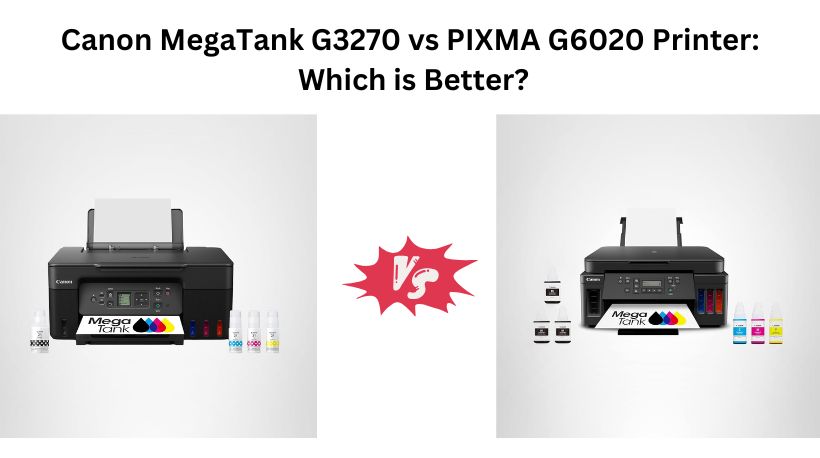
If you’re looking for an affordable ink tank printer with extremely low running costs, both the Canon MegaTank G3270 and Canon PIXMA G6020 are excellent choices. They include up to two years of ink, print thousands of pages from a single set of bottles, and support wireless printing, scanning, and copying.
However, these printers target different users. The Canon MegaTank G3270 is designed for home users and students who want an inexpensive all-in-one printer, while the Canon PIXMA G6020 is built for small offices and heavy-duty home users with faster printing, automatic duplex printing, larger paper capacity, and Ethernet connectivity.
Why Search Everywhere? Use Comparly for Your Next Comparison.
Quick Decision:Canon MegaTank G3270 vs PIXMA G6020
- 👉 Buy the Canon MegaTank G3270 if you want the most affordable MegaTank printer with wireless printing, scanning, copying, excellent print quality, and ultra-low ink costs for everyday home use.
- 👉 Buy the Canon PIXMA G6020 if you need a more powerful printer with faster performance, automatic duplex printing, a 350-sheet paper capacity, Ethernet connectivity, and better productivity for home offices or small businesses.
Canon MegaTank G3270 vs Canon PIXMA G6020 Printer: Specs Comparison
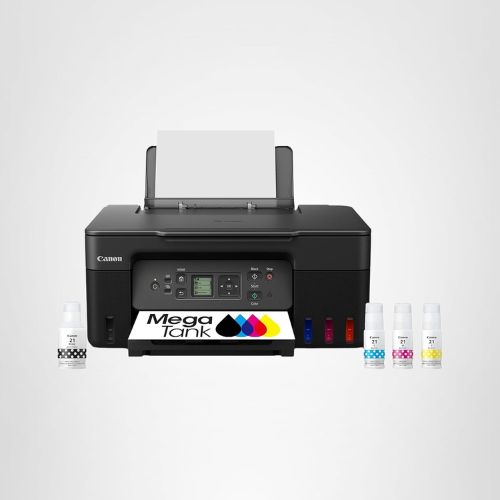
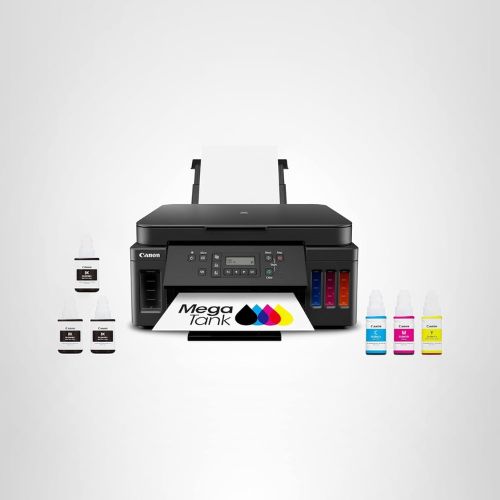
Feature | Canon MegaTank G3270 | Canon PIXMA G6020 |
Printer Type | All-in-One Inkjet | All-in-One Inkjet |
Functions | Print, Copy, Scan | Print, Copy, Scan |
Print Speed | 11 ppm | 13 ppm |
Color Print Speed | 6 ppm | Faster overall |
Duplex Printing | Manual (Single-sided only) | Automatic 2-sided |
Paper Capacity | Standard | 350-sheet capacity with 3 trays |
Display | 1.35-inch Square LCD | 2-line LCD |
Best For | Home users, students | Home offices, small businesses |
Price | $159 | $249 |
🏆 Which is Better Canon MegaTank G3270 vs Canon PIXMA G6020?
The Canon PIXMA G6020 is the better printer overall.
Although it costs about $90 more, it offers significantly better productivity with faster printing, automatic duplex printing, a much larger paper capacity, Ethernet support, and better office-friendly features. It’s designed for users who print frequently and want minimal interruptions.
The Canon MegaTank G3270, on the other hand, delivers outstanding value for budget-conscious buyers. If your printing needs are occasional and mostly for school, home, or personal documents, it offers nearly the same ink savings at a much lower price.
Top 3 Reasons to Buy the Canon PIXMA G6020
✅ Faster 13 ppm printing with better productivity
✅ Automatic two-sided printing saves paper and time
✅ 350-sheet paper capacity with Ethernet connectivity for office use
Want to compare more products like this? Use Comparly for Your Next Comparison.
1. Design & Build Quality
Canon MegaTank G3270
The Canon MegaTank G3270 is designed primarily for home users who want a compact, easy-to-place printer. Weighing only 13.2 pounds, it takes up less desk space and can comfortably fit on a bookshelf, study table, or small home office workstation. Its clean black finish gives it a modern appearance, while the transparent front-mounted ink tanks make it easy to monitor ink levels without opening the printer.
The printer includes a 1.35-inch square LCD display, which makes everyday tasks like wireless setup, maintenance, and selecting copy functions simple. Although the display is relatively small, it’s sufficient for casual users who don’t need advanced controls.
Overall, the G3270 focuses on simplicity, affordability, and ease of use rather than office-grade productivity.
Canon PIXMA G6020
The Canon PIXMA G6020 has a larger and more robust design because it’s built for users who print much more frequently. At 17.8 pounds, it’s noticeably heavier than the G3270, but the extra size accommodates a much larger paper handling system and additional internal components.
It features a 2-line LCD display that provides quick access to printer settings and maintenance options. While the display isn’t color, it’s practical and easy to read for everyday office tasks.
The larger body also houses multiple paper trays and supports high-capacity paper loading, reducing interruptions during long print jobs.
Winner: Canon PIXMA G6020
The G3270 is excellent for compact spaces, but the G6020 offers a sturdier design that’s better suited for heavy daily use.
2. Print Quality & Printing Speed
Both printers use Canon’s MegaTank ink system and produce excellent print quality for documents, presentations, school assignments, and color photos. They support a maximum print resolution of 4800 × 1200 dpi, delivering sharp black text and vibrant color output.
Canon MegaTank G3270
The G3270 prints at speeds of 11 pages per minute (ppm) for black-and-white documents and approximately 6 ppm for color prints. These speeds are more than adequate for homework, personal documents, invoices, recipes, and occasional photo printing.
Its borderless printing feature also allows users to print attractive photos without white borders, making it a versatile printer for families.
Canon PIXMA G6020
The G6020 increases black print speed to 13 ppm, helping users complete large print jobs more quickly. While the improvement may appear small on paper, it becomes noticeable when printing hundreds of pages every month.
The printer is optimized for continuous document printing, making it a better option for home offices, teachers, freelancers, and small businesses that regularly print reports, contracts, or study materials.
Both printers deliver excellent image quality, but the G6020 is simply faster and more efficient for higher workloads.
Winner: Canon PIXMA G6020
It provides the same high-quality output while reducing waiting time for larger print jobs.
3. Ink System & Running Cost
One of the biggest reasons buyers choose Canon MegaTank printers is their incredibly low operating cost, and both models perform equally well in this area.
The G3270 and G6020 both include enough ink to last up to two years under typical home usage. Each complete ink set can print approximately:
- Up to 6,000 black-and-white pages
- Up to 7,700 color pages
Compared to traditional cartridge printers, both models can save users up to $1,000 in ink costs over time.
The refill process is also simple thanks to Canon’s spill-resistant bottle design, making maintenance quick and mess-free.
Whether you’re printing school projects, office documents, family photos, or business forms, both printers offer exceptionally low cost per page.
Winner: Tie
Both printers use the same efficient MegaTank system and provide identical page yields and ink savings.
4. Paper Handling & Productivity
Paper handling is one of the biggest differences between these two printers.
Canon MegaTank G3270
The G3270 is intended for lighter workloads. It supports standard paper loading and single-sided printing only, meaning you’ll need to manually flip paper if you want to print on both sides.
For occasional printing, this isn’t a major inconvenience, but it can become time-consuming if you frequently print long reports or documents.
Canon PIXMA G6020
The G6020 is built with productivity in mind. It features automatic duplex (two-sided) printing, allowing documents to print on both sides without any manual intervention.
Even more impressive is its 350-sheet maximum paper capacity, spread across three separate paper sources. This allows users to keep different paper types loaded simultaneously, such as plain paper in one tray and photo paper in another.
Large paper capacity also means less time spent refilling paper, making the G6020 ideal for businesses and busy home offices.
Winner: Canon PIXMA G6020
Its automatic duplex printing and much larger paper capacity make it significantly more productive than the G3270.
5. Connectivity & Smart Features
Both printers support wireless printing and work with Canon’s mobile printing solutions, allowing users to print directly from smartphones, tablets, and laptops without connecting cables.
Canon MegaTank G3270
Connectivity options include:
- Wi-Fi
- USB
- Wireless printing from mobile devices
- Scan and copy functions
It’s perfect for households where a few devices need occasional access to the printer.
Canon PIXMA G6020
The G6020 includes everything offered by the G3270 while adding several professional features:
- Wi-Fi
- USB
- Ethernet connectivity
- Amazon Alexa compatibility
- Voice control support
Ethernet provides a more stable network connection than Wi-Fi, especially in offices where multiple computers share the same printer. Voice assistant compatibility also adds convenience for users who already use smart home devices.
Winner: Canon PIXMA G6020
Its additional Ethernet support and smart features make it more flexible for both home and office environments.
6. Ease of Use & Display
Both printers are straightforward to set up and maintain, thanks to Canon’s user-friendly software and refillable MegaTank design.
The G3270’s 1.35-inch square LCD offers a simple interface that’s perfect for beginners. Basic printing, copying, wireless setup, and maintenance tasks are easy to navigate.
The G6020 uses a 2-line LCD display, which provides more detailed information during setup and printer management. Since the G6020 includes additional productivity features such as duplex printing and multiple paper trays, the larger interface makes operating the printer slightly easier.
Neither printer includes a touchscreen, but both provide a simple and reliable user experience.
Winner: Canon PIXMA G6020
The larger display and additional controls better complement its advanced feature set.
7. Price & Overall Value
Price is where the G3270 has a clear advantage.
At $159, it delivers exceptional value by offering wireless printing, scanning, copying, excellent print quality, and Canon’s highly economical MegaTank ink system. For students, families, and casual home users, it’s difficult to find a better printer at this price.
The G6020 costs $249, making it approximately $90 more expensive. However, that higher price brings meaningful upgrades, including faster printing, automatic duplex printing, a 350-sheet paper capacity, Ethernet connectivity, and better productivity for users with heavier printing needs.
If you print only occasionally, the G3270 is the smarter financial choice. But if you print hundreds of pages every month, the G6020’s productivity features can easily justify the additional cost.
Winner: Depends on your needs
- Choose the Canon MegaTank G3270 for the best budget value.
- Choose the Canon PIXMA G6020 if productivity and office features are your priority.