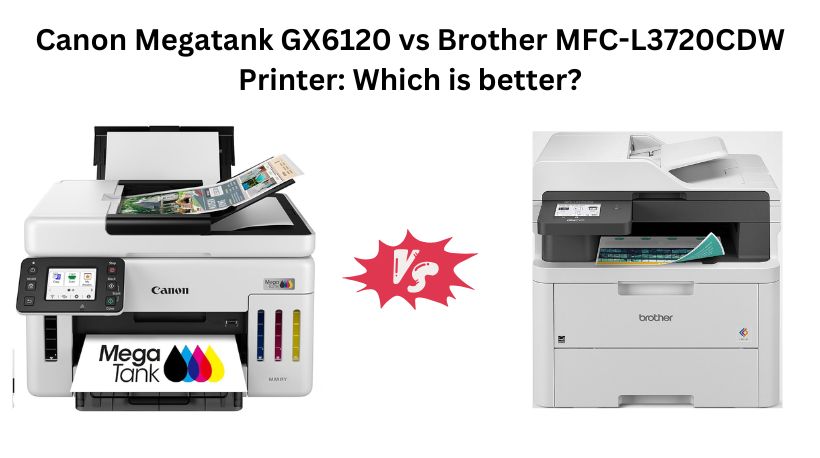
If you’re looking for a reliable all-in-one printer for your home office or small business, the Canon MegaTank GX6120 and Brother MFC-L3720CDW are two excellent choices. However, they use completely different printing technologies—Canon uses an inkjet MegaTank system while Brother uses a color laser engine.
The right choice depends on what you print most. If you print thousands of color pages every month and want the lowest running costs, Canon is the better investment. If you mainly print office documents and want fast, maintenance-free laser printing, Brother is the stronger option.
Why Search Everywhere? Use Comparly for Your Next Comparison.
Quick Decision: Canon MegaTank GX6120 vs Brother MFC-L3720CDW
🏆 Buy the Canon MegaTank GX6120 if:
- You print high volumes every month.
- You need extremely low cost per page.
- You print lots of color documents and photos.
- You prefer refillable ink tanks instead of toner cartridges.
- You want up to two years of ink included.
🏆 Buy the Brother MFC-L3720CDW if:
- You mostly print business documents.
- You want crisp laser text.
- You need Fax support.
- You want a larger touchscreen and cloud integration.
- You prefer laser printers with minimal maintenance.
Canon GX6120 vs Brother MFC-L3720CDW Printer: Specs Comparison
Feature | Canon GX6120 | Brother MFC-L3720CDW |
Printing Technology | Inkjet MegaTank | Color Laser |
Functions | Print, Scan, Copy | Print, Copy, Scan,Fax |
Print Speed | 24 ppm | 19 ppm |
Color Print Speed | 15.5 ppm | 19 ppm |
Fax | Yes | ✅ Yes |
Automatic Document Feeder | Yes | Yes |
Display | 2.7-inch Touchscreen | 3.5-inch Touchscreen |
Best For | High-volume, low-cost printing | Business document printing |
Price | $459 | $479 |
Which Printer Is Better Canon GX6120 or Brother MFC-L3720CDW?
Winner: 🏆 Canon MegaTank GX6120
Overall, the Canon MegaTank GX6120 is the better printer for most buyers.
Although it costs around $20 more, the MegaTank ink system dramatically reduces printing costs. Canon even includes enough ink for up to two years of typical use, making it one of the most economical printers for heavy users.
The Brother printer is still excellent, especially for offices that mainly print black-and-white documents, but the long-term toner costs are significantly higher than Canon’s refillable ink system.
Top 3 Reasons to Buy the Canon GX6120
1. Extremely Low Running Costs
The refillable MegaTank system costs far less per page than laser toner cartridges. Businesses printing thousands of pages each year can save hundreds of dollars over time.
2. Better for Color Printing
Inkjet technology produces richer colors and smoother gradients, making it a better choice for presentations, brochures, graphics, and occasional photo printing.
3. Huge Ink Supply Included
Canon includes enough ink to last up to two years under typical usage, meaning you may not need to buy replacement ink for a long time.
Want to compare more products like this? Use Comparly for Your Next Comparison.
Design & Build Quality
Both printers are designed for small businesses and home offices, but they have different priorities.
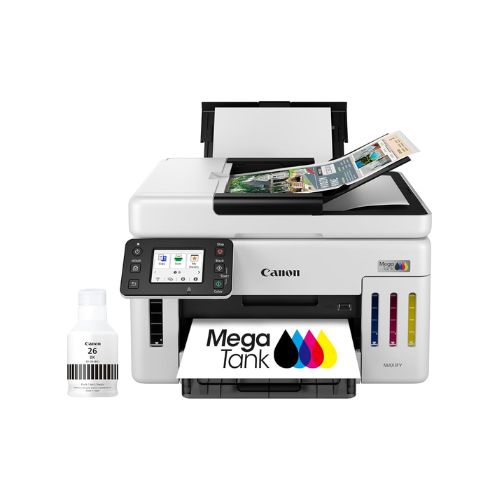
The Canon GX6120 features a compact, space-saving design that fits easily on a desk despite housing large refillable ink tanks. The white finish gives it a modern appearance, and the visible ink tanks let you monitor ink levels at a glance. At only 25.6 pounds, it is also much easier to move or reposition.
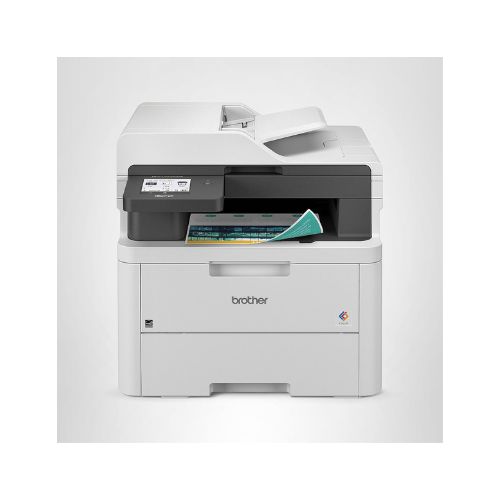
The Brother MFC-L3720CDW is considerably larger and heavier at 44 pounds, reflecting its laser printing hardware. While it occupies more desk space, it feels exceptionally solid and built for daily office workloads. The larger chassis also accommodates its laser engine and internal components.
Winner: Canon GX6120
Printing Technology & Print Quality
This is the biggest difference between these printers.
The Canon GX6120 uses a refillable inkjet MegaTank system. It delivers vibrant colors, smooth gradients, and excellent photo quality. Marketing materials, charts, and colorful business documents look more vivid than they do on most color laser printers.
The Brother MFC-L3720CDW uses color laser technology, which excels at producing sharp text. Contracts, invoices, reports, and spreadsheets come out with crisp lettering that resists smudging.
If your work revolves around documents, Brother has the edge. If you need both documents and high-quality color graphics, Canon is more versatile.
Winner: Tie (depends on usage)
Print Speed
Canon offers:
- Black: 24 ppm
- Color: 15.5 ppm
Brother delivers:
- Black: 19 ppm
- Color: 19 ppm
Brother provides consistent speeds for both black and color printing, making it ideal for mixed office jobs. Canon is faster for black documents but slightly slower for color pages.
In real-world office use, both printers are fast enough for small businesses, but Brother’s balanced speed gives it an advantage for frequent color document printing.
Winner: Brother MFC-L3720CDW
Running Costs
This category strongly favors Canon.
The MegaTank refill system is designed for ultra-low printing costs. Refilling ink bottles costs much less than replacing toner cartridges, and the included ink supply covers a very large number of pages.
Brother’s laser printer has higher consumable costs because toner cartridges eventually need replacement. While laser printers generally require less day-to-day maintenance, toner expenses can add up quickly for high-volume users.
For businesses printing hundreds or thousands of pages each month, Canon can save substantial money over its lifetime.
Winner: Canon GX6120
Paper Handling
Both printers include:
- 250-sheet paper tray
- Automatic duplex printing
- Automatic document feeder
Brother specifies a 50-sheet ADF, making it especially useful for scanning or copying multi-page documents.
Canon also includes an ADF but focuses more on maintaining a compact footprint.
For everyday office work, both handle paper efficiently with very similar capabilities.
Winner: Brother (slight edge)
Display & Ease of Use
Canon features a 2.7-inch touchscreen, while Brother includes a larger 3.5-inch color touchscreen with 48 customizable shortcuts.
Brother’s interface is more business-oriented, offering quick access to cloud services such as Google Drive, Dropbox, and OneNote directly from the printer.
Canon’s interface is simple and intuitive, making setup and daily operation straightforward.
If productivity features matter, Brother provides the better experience.
Winner: Brother
Connectivity & Smart Features
Canon supports:
- Wi-Fi
- Easy wireless setup
- Mobile printing
Brother includes:
- Dual-band Wi-Fi
- Wi-Fi Direct
- USB 2.0
- Mobile management app
- Cloud services
- Remote toner monitoring
Brother clearly offers a more extensive set of connectivity options, especially in multi-user office environments.
Winner: Brother
Scan, Copy & Fax
Canon includes:
- Scan
- Copy
Brother includes:
- Scan
- Copy
- Fax
For businesses that still rely on fax communication, Brother provides additional functionality without requiring another machine.
Winner: Brother
Value for Money
At first glance, Brother appears to offer more features for $459, including fax support, a larger touchscreen, better connectivity, and laser printing.
However, when long-term ownership costs are considered, Canon’s refillable MegaTank system delivers significantly better value. Businesses that print frequently will spend far less on ink over the printer’s lifetime.
If you print only a few hundred pages each month, Brother offers excellent value. If you print thousands of pages annually, Canon becomes the more economical investment.
Winner: Canon GX6120
Final Verdict
The Canon MegaTank GX6120 is the better overall choice for users who print frequently and want the lowest possible long-term printing costs. Its refillable MegaTank system, included ink supply, compact design, and excellent color output make it ideal for home offices, educators, and small businesses with heavy printing needs.
The Brother MFC-L3720CDW shines in traditional office environments. Its color laser engine delivers consistently sharp text, while features such as fax capability, dual-band Wi-Fi, a larger 3.5-inch touchscreen, cloud integrations, and customizable shortcuts make it a strong productivity printer for document-heavy workflows.